· Click "File Backup" on the homepage, then click "Create New".
· Select the local backup folder, choose whether to limit the file types for backup, and click "Next Step".
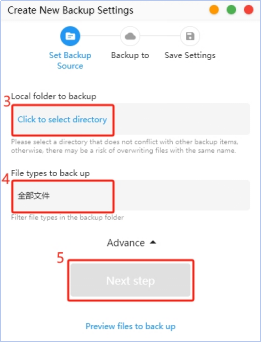
· Select the save path on CyberData app, then click "Next".
· Finally, choose the automatic backup strategy (LAN backup or other types), set the name, and click "Submit" to complete the backup task creation.

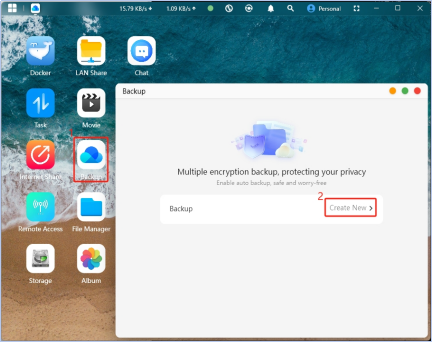
· Click "Backup" on the homepage, then click "Create New".

Android App Backup
Android phones offer more optional features in the backup interface.
In addition to basic photo album backup and contact backup, the following items support intelligent backup:
- Document Backup: Word, PPT, Excel, PDF, RTF
- WeChat File Backup: Photos, videos, and files from WeChat (cannot backup WeChat chat history)
- Audio Recording Backup: Recording files, call recordings
- Music Backup: Non-recording audio files larger than 1MB
- E-book Backup: EPUB, MOBI, etc.
- Short Video Backup: Video files smaller than 20MB
- Custom Backup:
- Folder Backup: More customizable backup options

Apple (iOS) File Backup
It comes with photo album backup and contact backup features.

Album Backup
Select "Album Backup," choose the "Local Folder to Backup" (select the system's default album folder here), and click Next
(1) You can open advanced options to filter out subfolders that do not need to be backed up
(2) You can preview the files to be backed up to avoid backup errors